How to File Crypto Taxes: Step-by-Step Guide (2026)
June 16, 20263 min read
Key Takeaways
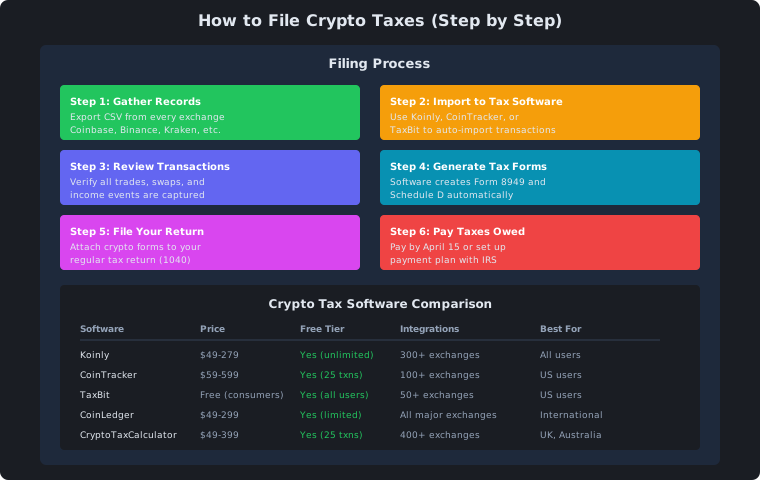
Filing crypto taxes starts with exporting records from every exchange and wallet, then importing them into crypto tax software.
Your software generates the needed forms — Form 8949, Schedule D, and Schedule 1 in the US, SA100/SA108 in the UK, and T1/Schedule 3 in Canada.
Deadlines differ by country: April 15 (US), January 31 (UK), and April 30 (Canada), with extensions available.
Report everything — tax authorities receive data from Coinbase, Kraken, and other exchanges, so omitting activity raises audit risk.
Filing crypto taxes doesn’t have to be overwhelming. With the right software and process, you can file correctly in under an hour.
Here’s the step-by-step process for US, UK, and Canada.
The Filing Process
Step 1: Gather All Exchange Records
Export CSV files from every exchange and wallet:
Source
How to Export
Coinbase
Reports → Tax → Download
Binance
Orders → Trade History → Export
Kraken
Settings → API → Download
Crypto.com
Accounts → Statement
MetaMask
Use tax software import
Don’t forget:
All exchanges (even closed ones)
DeFi wallets (MetaMask, Trust Wallet)
Hardware wallets (Ledger, Trezor)
Staking platforms
Step 2: Import to Tax Software
Use crypto tax software to auto-import transactions:
Software
Import Method
Time
Koinly
CSV, API, wallet address
5 min
CoinTracker
CSV, API
5 min
TaxBit
CSV, API
5 min
CoinLedger
CSV, API
5 min
Step 3: Review and Categorize
Check that all transactions are correctly categorized:
Transaction Type
What to Check
Trades
Cost basis correct
Swaps
Both sides recorded
Income
Staking, farming, airdrops
Losses
Tax-loss harvesting opportunities
Step 4: Generate Tax Forms
Your software generates the forms you need:
Form (US)
Purpose
Form 8949
Individual crypto transactions
Schedule D
Capital gains summary
Schedule 1
Other income (staking, etc.)
Form 1040
Total tax return
Step 5: File Your Return
Method
Best For
Tax software
Most people
Tax professional
Complex DeFi
IRS Free File
Simple returns
US Filing Details
Deadlines
Deadline
What
April 15
Tax return due
April 15
Tax payment due
October 15
Extension deadline
January 31
Exchange sends 1099s
Required Forms
Form
When Needed
Form 1040
Always
Schedule 1
If you have staking income
Form 8949
If you sold crypto
Schedule D
Capital gains summary
Tax Rates (2026)
Rate
Income Range
0%
$0 - $47,025
15%
$47,026 - $518,900
20%
$518,901+
28%
Collectibles (NFTs)
UK Filing Details
Deadlines
Deadline
What
January 31
Self Assessment online
October 31
Paper return
July 31
Second payment on account
Required Forms
Form
Purpose
SA100
Main tax return
SA108
Capital gains supplement
SA106
Foreign income
Canada Filing Details
Deadlines
Deadline
What
April 30
Tax return due
June 15
Self-employed deadline
April 30
Payment due
Required Forms
Form
Purpose
T1 General
Main tax return
Schedule 3
Capital gains
T5008
Securities transactions
Common Filing Mistakes
Mistake
Consequence
Not reporting all exchanges
IRS audit risk
Using wrong cost basis
Incorrect tax amount
Missing DeFi transactions
Underreporting income
Not reporting small amounts
All income is taxable
Filing late
Penalties and interest
Software Recommendation
Software
Best For
US
UK
Canada
Koinly
All users
Yes
Yes
Yes
CoinTracker
US users
Yes
No
No
TaxBit
Free option
Yes
No
No
CoinLedger
International
Yes
Yes
Yes
CryptoTaxCalculator
UK/AU
No
Yes
Yes
The filing checklist
Key Point
Takeaway
Gather records
Export CSV from all exchanges
Use tax software
Koinly, CoinTracker, or TaxBit
Review transactions
Check categories and amounts
Generate forms
Software creates them automatically
File by deadline
April 15 (US), Jan 31 (UK), Apr 30 (CA)
Report everything
IRS/HMRC/CRA have your data
A practical filing calendar
The difference between a smooth filing and a frantic one is almost always timing. Start in January, when exchanges begin issuing 1099s, and export CSV files from every source — including exchanges you have closed, DeFi wallets like MetaMask and Trust Wallet, hardware wallets, and staking platforms. Import everything into your tax software, then review the categories: trades need correct cost basis, swaps need both sides recorded, and any staking, farming, or airdrop income needs a proper income classification. That leaves you weeks to resolve discrepancies rather than an hour on deadline day. Generating the forms and submitting well before the due date also gives you room to correct a mistake if the software flags an anomaly.
What to avoid
Most filing problems trace back to incomplete records rather than malice. Not exporting every exchange you have used — including ones you closed years ago — leaves transactions missing that the IRS or HMRC can still see. Using the wrong cost basis for a disposal produces an incorrect tax amount, and missing DeFi transactions underreports income. Some filers assume small amounts don’t matter, but all income is taxable and the data sharing makes omissions visible. Filing late adds penalties and interest on top of any other problem. The single best guard is to report everything and give yourself the time to do it carefully, because an honest but slightly late return is easier to fix than one that hides activity.
Frequently Asked Questions
Do I need to report crypto even for small amounts?
Yes. All crypto income and disposals are reportable regardless of size, and exchanges such as Coinbase and Kraken report transaction data to the IRS and other authorities. If you don't report, they will still have the records.
What tax forms do I need for crypto in the US?
You generally need Form 1040, Form 8949 for individual crypto transactions, Schedule D as the capital gains summary, and Schedule 1 if you have staking or other crypto income. Your tax software generates these automatically from your imported transactions.
How do I choose the right crypto tax software?
Koinly supports the US, UK, and Canada and handles complex DeFi well; CoinTracker is strong for US users; CoinLedger covers the US, UK, and Canada; and CryptoTaxCalculator suits UK and Australian filers. Choose based on your country and the complexity of your activity, and try free tiers before paying.
What happens if I file late?
Filing late attracts penalties and interest in every country. The deadlines are April 15 in the US, January 31 for UK Self Assessment online, and April 30 in Canada, with extensions available in some cases. Starting your record-gathering in January avoids a rushed, mistake-prone submission.
PP
PaisayehPaisa Editorial Team
Financial education in plain language. Our team reviews every article for accuracy and clarity.