A crypto wallet is how you store, send, and receive cryptocurrency. Choosing the right wallet is one of the most important decisions in crypto.
Here’s everything you need to know.
The Golden Rule
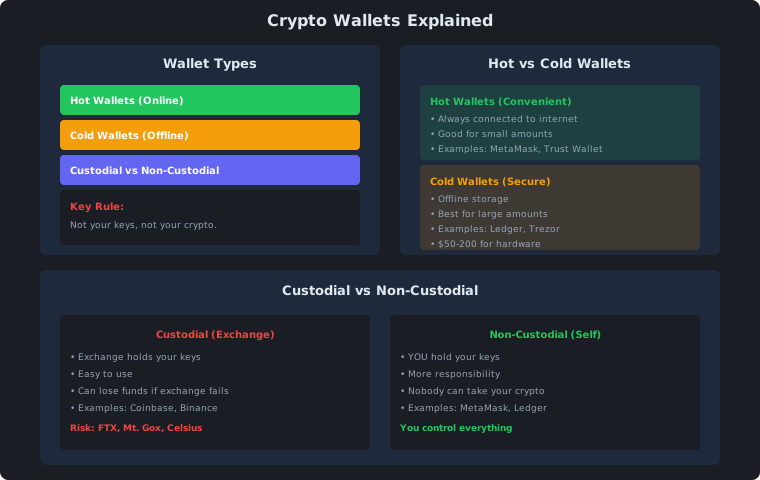
Not your keys, not your crypto.
If someone else holds your private keys, they control your crypto. If the exchange fails (like FTX), your money is gone.
Wallet Types
Hot Wallets (Online)
Always connected to the internet. Convenient but less secure.
| Wallet | Type | Best For |
|---|---|---|
| MetaMask | Browser extension | DeFi, NFTs |
| Trust Wallet | Mobile app | All-around |
| Phantom | Browser extension | Solana ecosystem |
| Coinbase Wallet | Mobile app | Beginners |
Pros:
- Easy to use
- Free
- Instant access
- Good for small amounts
Cons:
- Connected to internet (hackable)
- Less secure for large amounts
- Can lose funds if device is compromised
Cold Wallets (Offline)
Physical devices that store keys offline. Most secure option.
| Wallet | Price | Best For |
|---|---|---|
| Ledger Nano S | $79 | Budget option |
| Ledger Nano X | $149 | Bluetooth, more storage |
| Trezor One | $69 | Open source |
| Trezor Model T | $219 | Touchscreen, premium |
Pros:
- Keys never touch internet
- Immune to online hacks
- Best for large amounts
- You control everything
Cons:
- Costs $50-200
- Less convenient
- Can lose the device (but can recover with seed phrase)
- Slight learning curve
Custodial vs Non-Custodial
Custodial (Exchange Holds Keys)
| Exchange | Risk Level |
|---|---|
| Coinbase | Low (US regulated) |
| Kraken | Low (US regulated) |
| Binance | Medium (offshore) |
| Smaller exchanges | High |
When to use: Small amounts, active trading
Risk: Exchange can fail, get hacked, or freeze your account
Non-Custodial (You Hold Keys)
| Wallet | Control |
|---|---|
| MetaMask | Full control |
| Ledger | Full control |
| Trezor | Full control |
When to use: Long-term holding, DeFi, large amounts
Benefit: Nobody can take your crypto
Recommended Setup
| Amount | Wallet Type |
|---|---|
| Under $1,000 | Exchange (Coinbase, Kraken) |
| $1,000-$10,000 | Hot wallet (MetaMask, Trust) |
| $10,000+ | Cold wallet (Ledger, Trezor) |
| $100,000+ | Multi-sig cold wallet |
How to Set Up a Wallet
MetaMask (Hot Wallet)
- Install browser extension or mobile app
- Create new wallet
- Write down 12-word seed phrase (NEVER share this)
- Set password
- Done — you now control your crypto
Ledger (Cold Wallet)
- Buy from official website (never eBay)
- Connect to computer
- Follow setup instructions
- Write down 24-word seed phrase
- Transfer crypto from exchange
Security Tips
| Do | Don’t |
|---|---|
| Write down seed phrase on paper | Store seed phrase digitally |
| Use strong, unique password | Reuse passwords |
| Enable 2FA on exchanges | Share private keys |
| Buy hardware wallet from official site | Buy from eBay/Amazon |
| Test with small amounts first | Send large amounts without testing |
Picking the right wallet at a glance
The choice comes down to how much you hold and how often you transact. For small balances under $1,000, keeping crypto on a reputable exchange like Coinbase or Kraken is reasonable — the convenience of quick trades and built-in security features like 2FA outweighs the custodial risk at that level. Once your holdings cross $1,000, a hot wallet such as MetaMask or Trust Wallet gives you full control while remaining practical for regular use. For amounts above $10,000, a hardware wallet is the standard recommendation — the one-time cost of $60-200 is trivial compared to the risk of losing everything to a phishing attack or device compromise.
Multi-signature wallets (multi-sig) sit at the top of the security hierarchy. A multi-sig setup requires multiple private keys to authorise a transaction — for example, two out of three keys must sign. This protects against a single point of failure: even if one key is compromised, the attacker cannot move your funds without the other keys. Services like Casa or Unchained offer managed multi-sig setups for individuals and families.
Wallet security mistakes that lead to lost funds
The most common cause of lost crypto is not exchange hacks — it is user error with seed phrases. Taking a screenshot of your seed phrase, storing it in a password manager, or typing it into a notes app all defeat the purpose of self-custody. If your phone or cloud account is compromised, every digitally stored seed phrase is exposed. Write it on paper or stamp it into metal, and store it somewhere physically secure.
Buying hardware wallets from unofficial sources is another frequent mistake. Resold Ledger or Trezor devices can be tampered with to extract your seed phrase during setup. Always purchase directly from the manufacturer’s official website. If a deal on a hardware wallet seems too good to be true on eBay or Amazon, it probably is.
Phishing is the attack vector that catches even experienced users. Scammers create fake versions of wallet interfaces — a fake MetaMask pop-up, a counterfeit Aave dashboard, or a fraudulent “wallet recovery” site. Never enter your seed phrase on any website, no matter how official it looks. Legitimate protocols and wallets will never ask for your seed phrase. Bookmark the real URLs of the sites you use and access them only through your bookmarks.
Getting started with your first wallet
If you are completely new to self-custody, the path of least resistance is MetaMask. Install the browser extension or mobile app, create a new wallet, and write down the 12-word seed phrase immediately. Send a small test amount — $20-50 worth of ETH — from your exchange to your MetaMask address. Once that arrives and you are comfortable with the interface, you can decide whether to continue with a hot wallet or invest in a hardware device.
For anyone holding more than a few hundred dollars, the next step is a Ledger or Trezor. The setup process takes 15-30 minutes. The key difference from a hot wallet is that your seed phrase is generated and stored entirely on the device — it never touches your computer or phone. This air gap is what makes hardware wallets resistant to the malware and phishing attacks that threaten software wallets.
Whatever you choose, treat your seed phrase like the combination to a safe. Multiple copies in different physical locations protect against fire or theft, but each copy must be as secure as the original. A safety deposit box, a fireproof safe, or a trusted family member’s secure storage are all reasonable options.
Further resources on wallet security
For deeper dives into specific wallet security topics, the Ledger Academy and Trezor documentation both provide detailed guides on best practices. The Bitcoin Wiki’s page on seed phrase storage is a classic reference that remains relevant for any cryptocurrency, not just Bitcoin.
If you want to understand the technical underpinnings of how wallets generate keys from seed phrases, BIP-39 and BIP-44 are the standards that govern the process. For a less technical overview of self-custody best practices, the Bitcoin Talk forums have extensive threads where experienced users share their security setups and the mistakes they learned from.